what can i put on my flash drive to by pass a locked accatel phone
FRP (Manufactory Reset Protection) Lock or iCloud Lock have been put in identify by Google and Apple respectively in the hopes to gainsay fraudulent activities that seek to undermine manufactory reset options. Nevertheless, this mobile device protocol has proven to exist problematic for people who forgot their login details or brought a secondhand unit of measurement. This led tricksters and developers to come up with a solution which we at present know every bit FRP featherbed.

This FRP bypass solution does not breach any legal protocols. However, information technology does incite legal questions over its utilize. Merely with one out of three Americans will totally forget his/her login details to the point of irrecoverability, FRP has also go a scrap of a hurting.
In this article, y'all volition learn how to bypass FRP on whatsoever Android telephone so you could perform a full hard reset. We will non be covering bypassing activation locks on iPhones as that's a dissimilar story.
Besides read: All-time Password Director Apps
Inside This Article
- What is FRP Bypass and How It Works?
- How to FRP Bypass Google Lock on Whatever Android Phone
- Recover Your Google Account on Another Device
- Bypass FRP on Android Phone
- FRP Featherbed APK
- Bypass FRP Without OTG
- Deactivate FRP in Your Android Device
- Takeaways on Bypassing FRP
What is FRP Bypass and How It Works?
A lost-and-institute book is equally good as a golden bar. And before the advent of the Android v.1 Lollipop, this phone would accept been easily accessible to whoever found it. Fast frontwards to Android Lollipop and succeeding Android OS versions, the story took a different turn.
Google Account Verification or Factory Reset Protection (FRP) in its new Android Os versions has effectively inverse the fashion we can access phones that are lost-and-found; the unproblematic factory reset protocol is no longer plenty to unlock the phone. The FRP effectively makes a phone inaccessible to anyone who performs a manufacturing plant reset on a lost-and-found phone and does not accept the login credentials of the business relationship synced in the device.
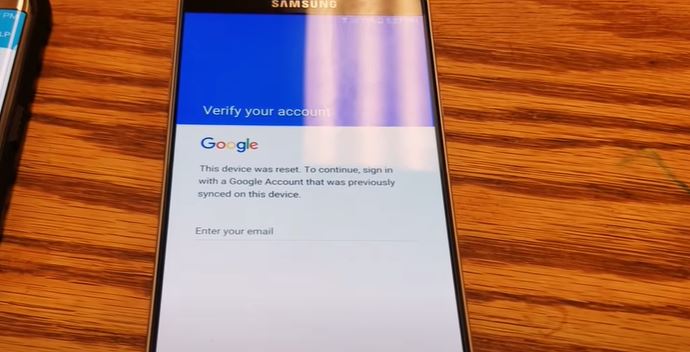
FRP on any Android device is automatically enabled one time a Google account is logged in to a device. The simply way to go rid of it is past removing the business relationship from the device into which information technology has been synced.
Our teams of experts have compiled easy and legit ways to conduct an FRP bypass on your Android device. Below are some of the noteworthy ways to practise this.
How to FRP Featherbed Google Lock on Whatsoever Android Phone
Many users encounter being asked to sign in to the Google accounts previously synced into their Android devices once again after resetting their Android phones or tablets. And this is proven problematic peculiarly, for some hypothetical reason when you have forgotten your email ID and password later on the reset.
The question now is: what should you practice? This commodity has outlined the safest, easiest, and legal means to FRP featherbed whatsoever locked telephone that yous may have.
A. Recover Your Google Account on Some other Device
Nosotros can't stress this enough but before yous effort to bypass the FRP of your Android phone, retrieving your Google account is the best and safest form of activeness you lot can take to proceed with the hard reset. Yous don't have to exercise this using the device subject for the reset. You can utilise some other phone or a computer to ready an alternate email or number for the business relationship yous desire to recover. Google should then send you lot a verification code so y'all can add a new countersign for your Google account.
It would take at least 24 hours for your new password to sync with other devices in which your Google business relationship is logged in. But go along the telephone you want to reset continued to a network and powered up for the time being. After some time, retry performing a factory reset on your phone and provide your Google account with its new password. If it pushed through, then you have to reset your phone without actually bypassing FRP.
B. Bypass FRP on Android Phone
Here are steps to FRP featherbed your device and skip the need to enter whatsoever Google account, which you can do later on. This might non work for everyone as manufacturers would frequently release software patches to prevent these sorts of hacks.
- Connect the device to the WIFI network. Make sure to choose the Google keyboard layout.
- On the sign-in page, tap the email field and tap the @ sign on your keyboard.
- Click Google Keyboard Setting on the dialogue box that will appear.
- Tap on the iii dots on the top right-mitt corner of the screen to open up options and tap Help & Feedback.
- Next, click on Search Google & Transport Outcome From Your Keyboard. The page will display a guide on doing this, which y'all tin can disregard.
- Tap on any discussion from the guide on your screen. The device is going to highlight the discussion in blue. Once highlighted, on the top right-manus corner, tap on Web Search.
- A dialogue box volition appear that will let you choose the next action to take. Tap on Google App. This will pull up results from the web for the give-and-take you take just Googled.
- Tap the search bar institute at the pinnacle eye of the screen and search for Setting. This volition display the system setting icon on the screen.
- Tap on system settings icon > Backup & Reset > Manufactory Information Reset. This will prompt resetting the device to factory settings.
- Once the reset is consummate, you will see the welcome folio of the device. Connect to your WIFI network. Nevertheless, you will now accept the selection to skip entering your email ID and password. If that is the case, you lot accept successfully FRP bypassed your device.

This guide is useful if you lot have forgotten your logins and wish to create a new Google account since the previous one is unretrievable for some reason.
C. FRP Bypass APK
FRP Bypass APK is a tool anyone can apply to bypass FRP on Google, in case logins are unrecoverable. This app erases the Google account synced in the Android device and unlocks it effectively.
However, we deemed it necessary to let every Android user know that bypassing the factory reset protection has get cumbersome over the past years. This is considering Google has added extra protocols and advancements to the FRP tool. But this is non a problem. Below is a guide to using FRP Bypass APK.
Additionally, this APK is accessible for all types of phones and is not express to merely Samsung phones. Information technology is also 100% free and safe to utilise.
Download FRP Bypass APK
Hither are the steps to using FRP Bypass APK:
- Download the FRP bypass apk file past clicking the source link higher up.
- Copy the .apk file to a flash bulldoze/USB one time the download is consummate.
- Open the device with the FRP issue. Connect the flash drive and mobile device through a USB on-the-get (OTG) cable. This will pull up a file explorer direct from your device.
- Next, earlier installing the .apk file, get to Settings, and so turn on the unknown sources option.
- Install the file to the device with the FRP issue.
- Once the installation is complete, open the app and get to the settings bill of fare.
- From in that location, tap on backup and reset option.
- Lastly, tap on manufactory information reset and and then tap on the confirm button.
Congratulations! Yous have just bypassed FRP Google lock on your Android device. All there'south left to practise is restart your device and go through the welcome page and skip adding a Google account to be set later on.
D. Bypass FRP Without OTG
Before proceeding with this option, it is of import to understand that we will not be using a USB OTG cable for this. Meaning, it is important to have a working Internet connection for this method.
- Set the device and connect to a network.
- Once you lot get to the FRP tool screen, tap the Settings icon on the keyboard.
- From there, navigate to the bill of fare button > help and feedback button.
- Next, type in whatever word you lot want earlier clicking Share.
- Later that, choose Messaging > New Bulletin > blazon any number on the To section.
- Tap on the Contacts icon.
- Next, tap on the Call icon > new telephone call options. This will pull upward the punch pad. Key in #*#4636#*#.
- From in that location, tap on the usage statistics option > tap on the back push. The Settings card will reappear soon.
- Tap on backup and reset option > factory information reset.
Voila! Yous take successfully bypassed FRP on your device using the FRP tool.
E. Deactivate FRP in Your Android Device
Here is some other option that is easy to follow. Your Android device activates the Factory Reset Protection (FRP) lock protocol automatically when an account is added to an Android device. Still, this can easily be deactivated, therefore finer bypassing the lock one time and for all.
This procedure will save you from any issues when setting the device subsequently reset. To do this, hither are the steps to follow:
- Open Settings.
- Navigate to and open Accounts.
- Tap Google.
- Select your Google business relationship from the list.
- Click the menu tool represented by three dots on the right-hand corner of the screen. This will pull upward a set of options. Tap Remove Account.
This method, by far, is the easiest for anyone with an Android device. Information technology might work for some and might not work for others. In any case, this is a good alternative and option to bear a Google verification bypass.
Takeaways on Bypassing FRP
Conducting an FRP bypass on your device, and therefore effectively bypassing Google verification, is not at all illegal. It does come with benefits for most. Moreover, there are a number of ways to featherbed Google verification — others can be done using a estimator. But these items nosotros take listed are, by far, the easiest and most accessible methods that can hands get rid of the verification process. Whether with an OTG cable or just simply deleting a Google account on the device, this list got you covered. Finally, if you find this article helpful, let usa know!
Source: https://cellularnews.com/guides/how-to-frp-bypass-lock-on-any-android-phone-easy-guide/
0 Response to "what can i put on my flash drive to by pass a locked accatel phone"
Enregistrer un commentaire